
Operation Manual



11
PRESETS
The device contains a total of forty-five user and Factory Presets. The user cannot overwrite the basic mono or basic stereo
base presets.
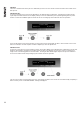
PRESET RECALL
To select an existing preset, press the Recall Button so the indicator above it illuminates. Turn parameter knob A until the
required preset number is shown on the display. Factory Presets are indicated by a box symbol appearing after the preset
number. Press the Recall Button again to activate the Preset. Pressing any other button will cancel the operation.
Users can develop their own preset based on one of the base presets stored within the device. Once a basic or user Preset
has been recalled, a user has complete freedom to adjust any or all of the parameters.
PRESET STORE
To store the current Preset in a user location, press the Preset Store Button so the indicator above it illuminates. Turn the first
parameter knob until the required Preset location number is show on the display. A Preset name of up to 12 characters in
length can be entered using parameter knobs B and C. Pressing the Store Button again completes the process and stores
the Preset. As with Preset Recall, pressing any other button cancels the operation.
The user can overwrite non-protected Presets only; if an attempt is made to save a Preset in a location already occupied by a
basic or Factory Preset a ‘LOCKED PRESET’ message is displayed.
Preset Name
Recall 32 My System
Preset Name
Store 32 My System