
Codec C90 Administrator Guide


Table Of Contents
- Introduction
- Getting started
- About the menus
- The Settings menu
- Administrator Settings Library
- Description of the administrator settings
- The Audio settings
- The Camera settings
- The Conference settings
- The Do not disturb setting
- The H323 Profile settings
- The Network settings
- The Camera settings
- The Phone book server settings
- The Provisioning settings
- The Serial port settings
- The SIP Profile settings
- The Standby settings
- The System unit settings
- The Time zone setting
- The Video settings
- The Experimental menu
- Description of the administrator settings
- Cameras
- Appendices
- General room guidelines
- Guidelines for the executive meeting room
- Guidelines for the high end meeting room
- The Video Input Matrix
- Software upgrade
- Upload certificates
- XML files
- Log files
- NTP Time Zone expressions
- Supported RFCs in SIP
- TANDBERG Remote Control TRC5
- TANDBERG Remote Control TRC5 key map
- The PrecisionHD camera
- CE Declaration for Codec C90
- China RoHS table
- TANDBERG Codec C90 dimensions
- PrecisionHD 1080p camera dimensions
- PrecisionHD camera dimensions
- Technical specifications
D14129.02—NOVEMBER 2008
41
Codec C90
Administrator Guide
Contents Introduction Getting started About the menus About the settings Settings Library Cameras Appendices Contact us
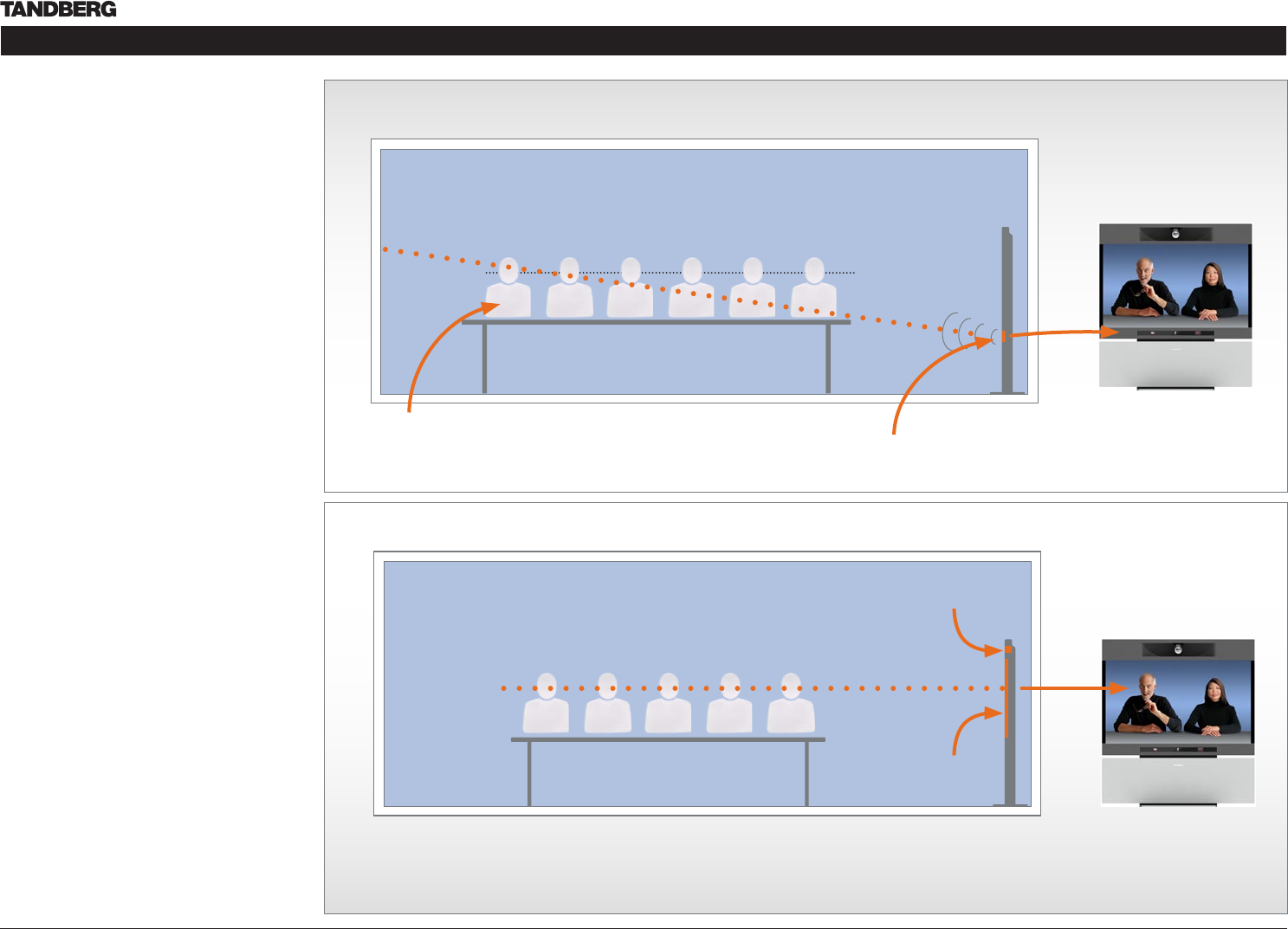
The audio quality
To keep the high quality audio, make sure there is
free sight to the speaker module
There should be free sight between the ears •
of the participants and the system speaker
module
Participant sitting too far away from the video •
system may not have the same audio quality as
the others.
Natural communication
Making eye contact with the far end participants
will improve the natural communication between
the people
Adjust the camera view (using zoom in/out) to •
allow the participants to be shown in full size
on screen, and to keep eye contact with each
other at the same eye level
If the participants are sitting too close to •
the monitor the camera will “look down” at
the participants. This may not give a good
presentation of the participants at the far end.
The far end participants
The best audio quality to all participants
Making eye contact
PrecisionHD
1080p camera
This participant may not have
the same audio quality as the
others
Speaker module
(DNAM)
65” LCD
monitor
The far end participants
Eye height
Ear height
The line of free sight
The picture (TANDBERG T1) serves as an
illustration to exemplify the content.
The picture (TANDBERG T1) serves as an
illustration to exemplify the content.