
Codec C90 Administrator Guide


Table Of Contents
- Introduction
- Getting started
- About the menus
- The Settings menu
- Administrator Settings Library
- Description of the administrator settings
- The Audio settings
- The Camera settings
- The Conference settings
- The Do not disturb setting
- The H323 Profile settings
- The Network settings
- The Camera settings
- The Phone book server settings
- The Provisioning settings
- The Serial port settings
- The SIP Profile settings
- The Standby settings
- The System unit settings
- The Time zone setting
- The Video settings
- The Experimental menu
- Description of the administrator settings
- Cameras
- Appendices
- General room guidelines
- Guidelines for the executive meeting room
- Guidelines for the high end meeting room
- The Video Input Matrix
- Software upgrade
- Upload certificates
- XML files
- Log files
- NTP Time Zone expressions
- Supported RFCs in SIP
- TANDBERG Remote Control TRC5
- TANDBERG Remote Control TRC5 key map
- The PrecisionHD camera
- CE Declaration for Codec C90
- China RoHS table
- TANDBERG Codec C90 dimensions
- PrecisionHD 1080p camera dimensions
- PrecisionHD camera dimensions
- Technical specifications
D14129.02—NOVEMBER 2008
36
Codec C90
Administrator Guide
Contents Introduction Getting started About the menus About the settings Settings Library Cameras Appendices Contact us
Cameras
Best view (beta) Exit
Best view—Face recognition
This camera is capable of face recognition when used with
TANDBERG C90 Codecs. Consequently, the functionality is subject
to change without further notice in order to take advantage of further
developments.
NOTE: Observe that the Best view feature is still a preview feature.
The face recognition system aims to search for faces in order to
optimize the picture frame, hence the name Best view. Once a face
or group of faces has been detected camera zoom and camera angle
will be changed accordingly to obtain an optimal presentation on the
screen.
Kindly observe the following:
The • Best view optimization process may take up to 5 seconds.
The detection of faces works better when people look towards the •
camera.
The area from the eyebrows down to just below the lips should be •
uncovered.
Beard is normally not a problem.•
Using Best view
Note that Best view works with TANDBERG C90 Codecs only!
Press the 1. Layout key on the remote control to display the
Layout menu. Select Selfview to be shown as required.
Press the 2. Home key on the remote control to display the
Home menu and select Camera control
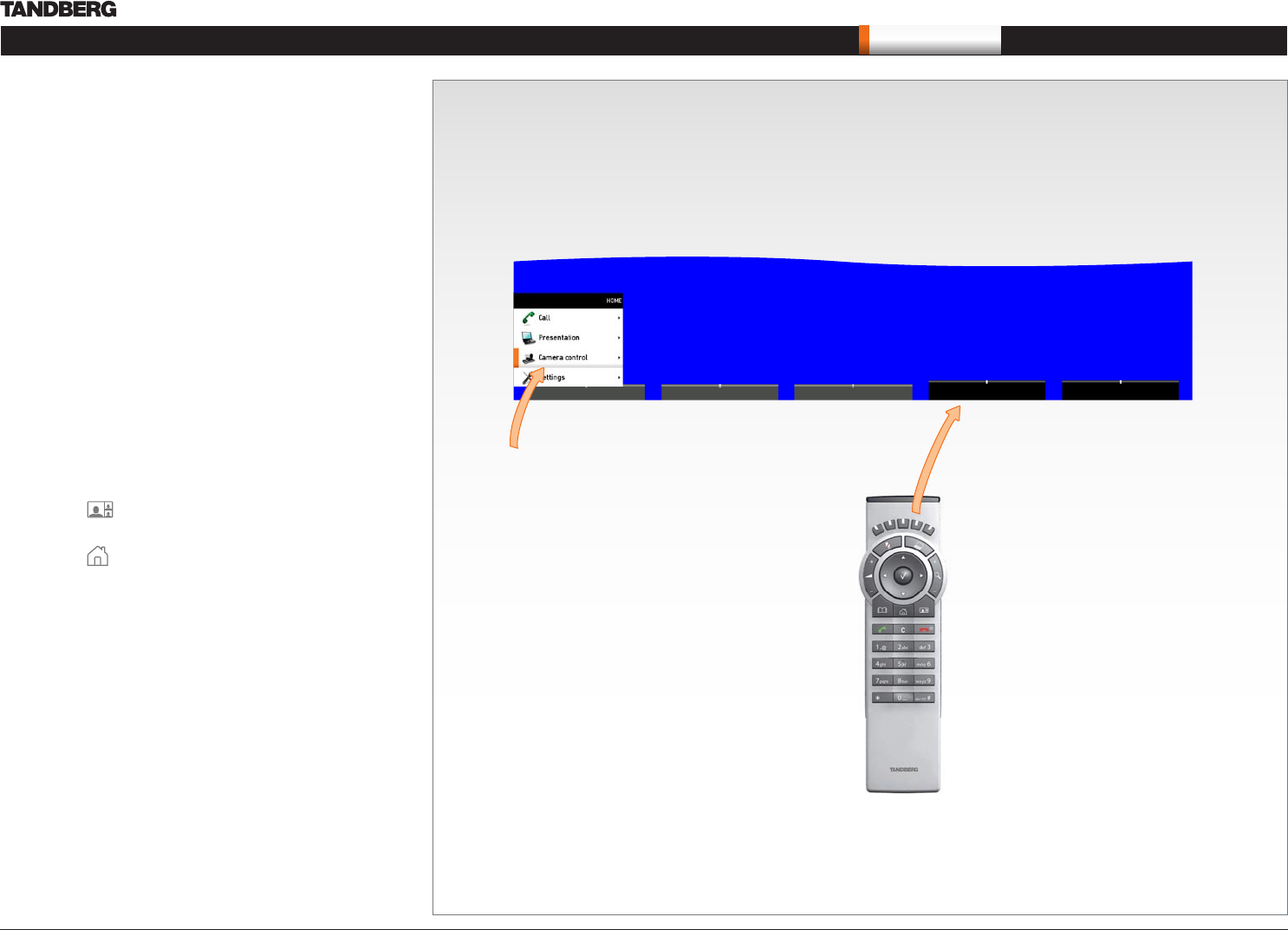
In the Camera control menu, locate the 3. Best view button at the
bottom of the screen.
Press the corresponding 4. Soft key on the remote control to start
the Best view optimization process. Look towards the camera for
about five seconds.
The system will now look for human faces and adjust the zoom 5.
and camera angle to obtain a best fit.
Press the corresponding
Soft key to start the Best
view optimization process.
The Best view feature is found
in the Camera control menu.