
Codec C90 Administrator Guide


Table Of Contents
- Introduction
- Getting started
- About the menus
- The Settings menu
- Administrator Settings Library
- Description of the administrator settings
- The Audio settings
- The Camera settings
- The Conference settings
- The Do not disturb setting
- The H323 Profile settings
- The Network settings
- The Camera settings
- The Phone book server settings
- The Provisioning settings
- The Serial port settings
- The SIP Profile settings
- The Standby settings
- The System unit settings
- The Time zone setting
- The Video settings
- The Experimental menu
- Description of the administrator settings
- Cameras
- Appendices
- General room guidelines
- Guidelines for the executive meeting room
- Guidelines for the high end meeting room
- The Video Input Matrix
- Software upgrade
- Upload certificates
- XML files
- Log files
- NTP Time Zone expressions
- Supported RFCs in SIP
- TANDBERG Remote Control TRC5
- TANDBERG Remote Control TRC5 key map
- The PrecisionHD camera
- CE Declaration for Codec C90
- China RoHS table
- TANDBERG Codec C90 dimensions
- PrecisionHD 1080p camera dimensions
- PrecisionHD camera dimensions
- Technical specifications
D14129.02—NOVEMBER 2008
34
Codec C90
Administrator Guide
Contents Introduction Getting started About the menus About the settings Settings Library Cameras Appendices Contact us
Cameras
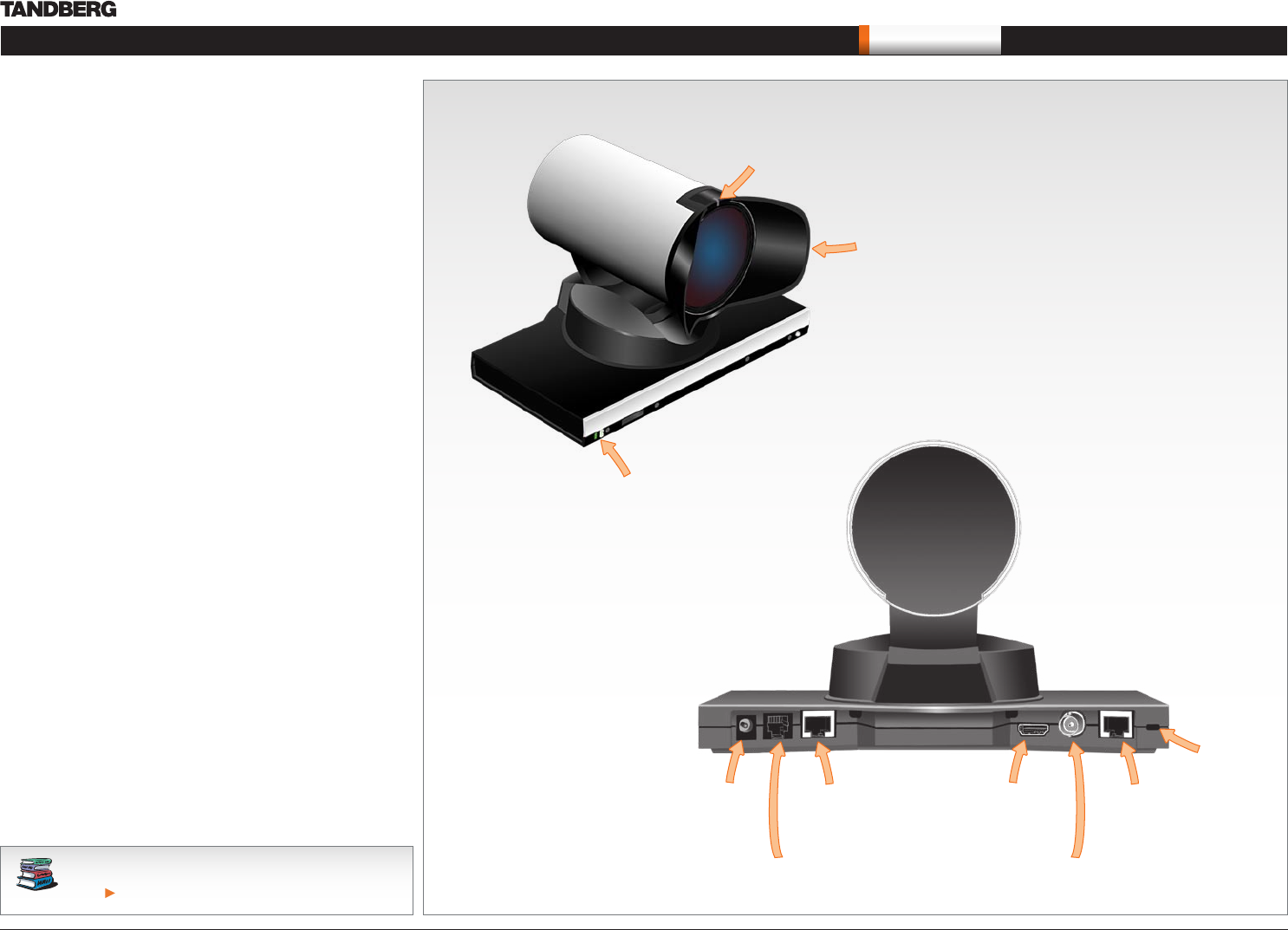
See the TANDBERG PrecisionHD 1080p User Guide for
comprehensive information about the camera.
Go to: http://www.tandberg.com/docs
The PrecisionHD 1080p camera
Video out (HDMI, HD-SDI). For video signals, connect from the
video out on the camera to the video in on the codec.
Power and camera control. For power in and camera control,
connect from the camera control & power on the camera to
the Camera port on the codec. When the camera is used with
TANDBERG codecs power will be supplied through Camera Control
cable. When used with non-TANDBERG Codecs, you may have to
connect power separately.
HDMI and HD-SDI
HDMI is the main source for video out when connected to Codec •
C90. Maximum resolution is 1080p60.
HD-SDI is the secondary source for video. Maximum resolution •
is 1080p30.
The HDMI and HD-SDI can be used simultaneously. The •
maximum resolution is then 1080p30 if you want both to run with
the same resolution.
Kensington lock
The Kensington lock may be used to prevent the camera to be
moved from its place or to prevent theft.
Cascaded cameras
The sockets named Extra Camera Out and Power In are used when
connecting cameras in daisy chain.
The first camera in the chain is powered up by the camera •
control cable. The next cameras must use the 12V DC Power in.
The daisy chained cameras are connected by using an extra •
camera cable between the Extra Camera sockets.
The
green LED
is continuously
illuminated when power
is On, but it flickers when
receiving signals from
the remote control.
Power Supply
Extra Camera Out and for Daisy Chaining
Camera Control HDMI Video Out
Not Used
HD-SDI Out
HDMI and HD-SDI can be
used simultaneously.
The lens hood is detachable.
We recommend that you
mount it to prevent stray light
from disturbing your video
experience.
Just snap it on gently.
The orange LED illuminates while in a
call and flickers when there is an
incoming call.
Kensington lock