
Codec C90 Administrator Guide


Table Of Contents
- Introduction
- Getting started
- About the menus
- The Settings menu
- Administrator Settings Library
- Description of the administrator settings
- The Audio settings
- The Camera settings
- The Conference settings
- The Do not disturb setting
- The H323 Profile settings
- The Network settings
- The Camera settings
- The Phone book server settings
- The Provisioning settings
- The Serial port settings
- The SIP Profile settings
- The Standby settings
- The System unit settings
- The Time zone setting
- The Video settings
- The Experimental menu
- Description of the administrator settings
- Cameras
- Appendices
- General room guidelines
- Guidelines for the executive meeting room
- Guidelines for the high end meeting room
- The Video Input Matrix
- Software upgrade
- Upload certificates
- XML files
- Log files
- NTP Time Zone expressions
- Supported RFCs in SIP
- TANDBERG Remote Control TRC5
- TANDBERG Remote Control TRC5 key map
- The PrecisionHD camera
- CE Declaration for Codec C90
- China RoHS table
- TANDBERG Codec C90 dimensions
- PrecisionHD 1080p camera dimensions
- PrecisionHD camera dimensions
- Technical specifications
D14129.02—NOVEMBER 2008
15
Codec C90
Administrator Guide
Contents Introduction Getting started About the menus About the settings Settings Library Cameras Appendices Contact us
About the menus
About the menus
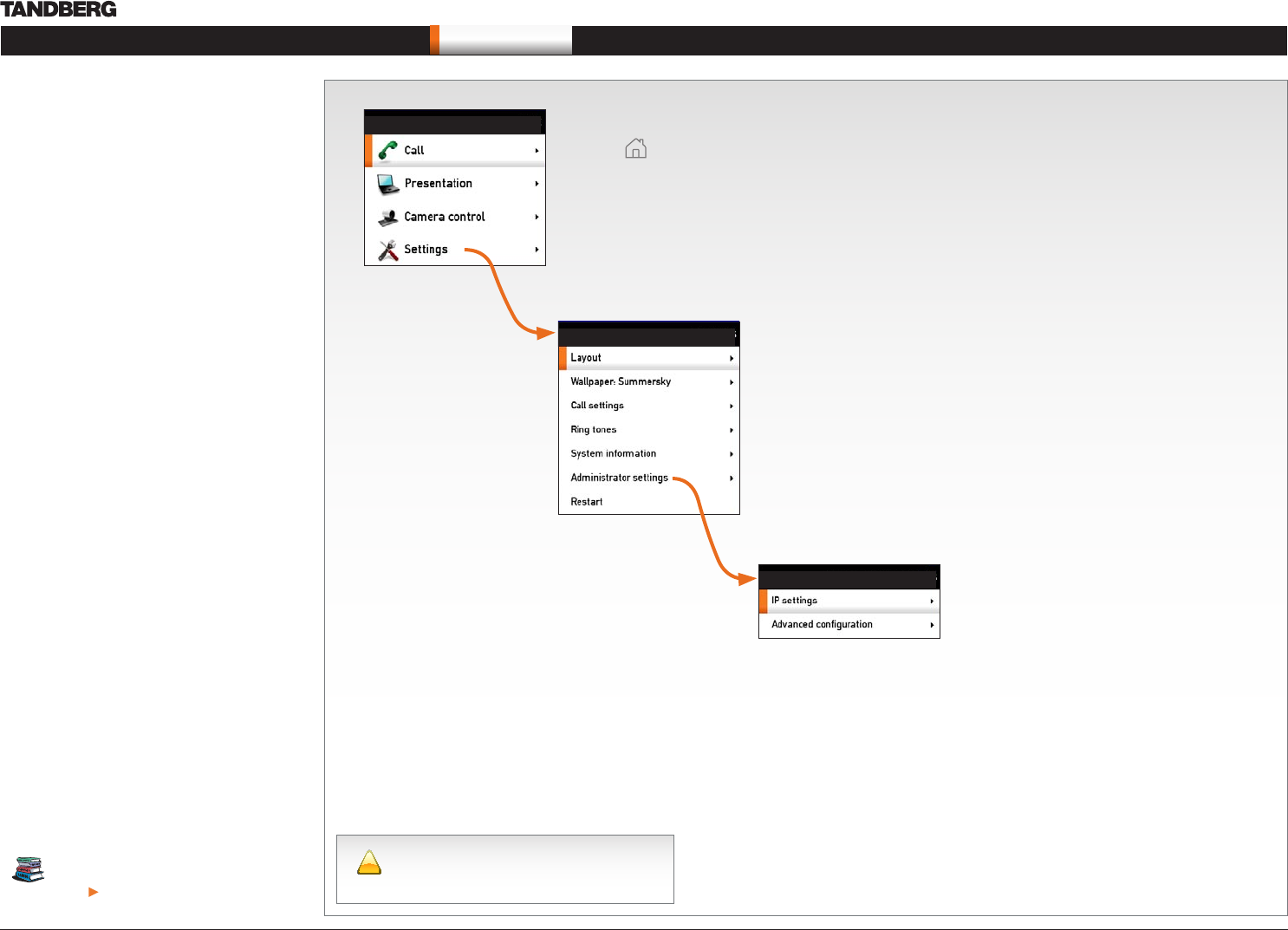
The menu system is divided into three levels:
The 1. Home menu
The 2. Settings menu
The 3. Administrator Settings menu
Navigate in the menus
Use the remote control to navigate in the menus:
Use the arrows down/up to select a menu item•
Use the arrow right to expand the selection•
Use the arrow left to go one step back•
Change a value
Select a value from a drop down list and press •
the OK button to save, or press the left arrow to
leave without saving.
Enter a value/text in a value/text field. Press •
Save to save the change or Cancel to leave
without saving.
The Home menu
Press the Home key on the remote control to open the Home menu:
Open the • Call menu to make a call
Open the • Presentation menu to select a presentation source
Open the • Camera control menu to pan, tilt or zoom the camera
Open the • Settings menu to configure the system
The Settings menu
The Settings menu lets the user:
Open the • Layout control menu to control the screen layout, including selfview
Select • Wallpaper to chose a background picture on screen
Open the • Call settings menu to configure the default bit rate and auto answer settings
Select • Ring tones to chose a ring tone
Open the • System Information page to see an overview of the system configurations
Open the • Administrator settings menu to configure the system
Select • Restart to restart the system.
The Administrator settings menu
The Administrator settings menu lets the user:
Open the • IP address menu to configure the IP settings
Open the • Advanced configuration menu to access the system configuration settings
!
Changes in the administrator settings may
affect the behavior of the system and should
be configured by the system administrator.
In this guide we will concentrate on what’s behind
the Administrator Settings menu and leave the
other menus to be explained in the Codec C90
User Guide.
You can download the Codec C90 User
Guide from our web site.
Go to: http://www.tandberg.com/docs
SETTINGS
HOME
ADMINISTRATOR SETTINGS