
User Manual


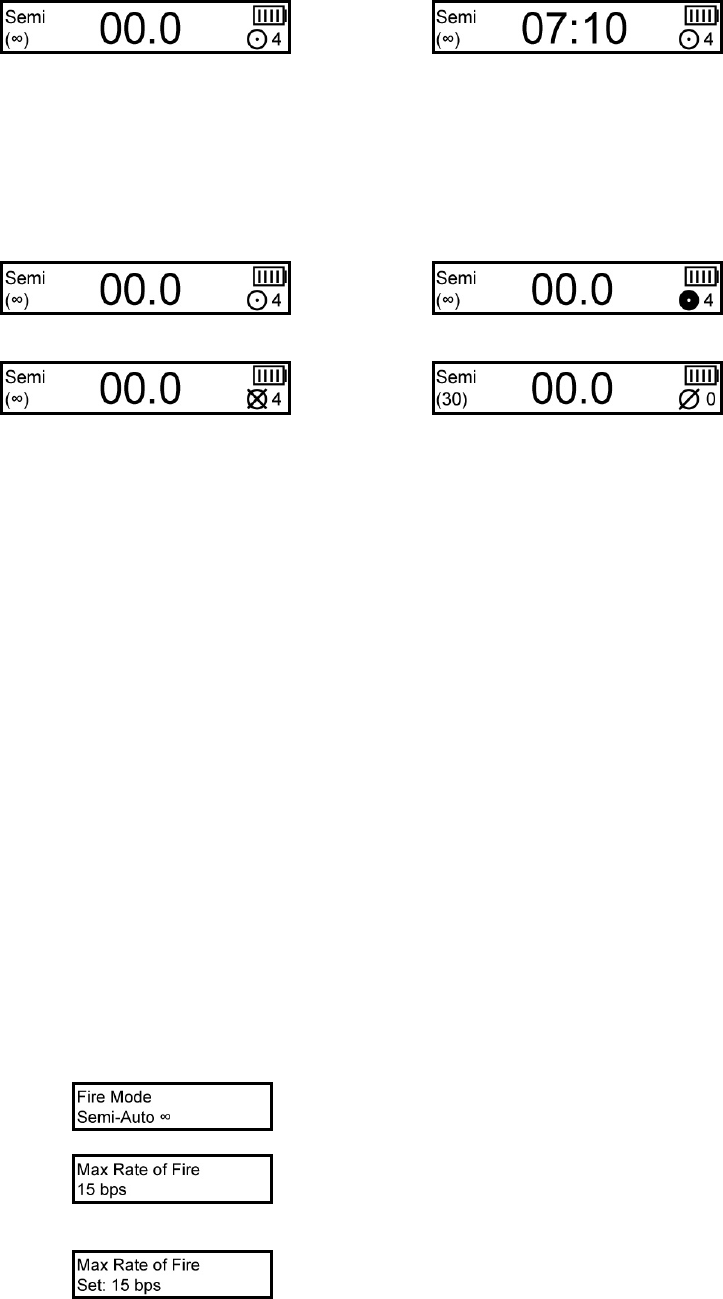
OLED DIAGRAMS
The OLED display built into the Yakuza series board shows the user a multitude of information via text and icons.
The software is written with performance in mind, and will not update the screen until the user stops shooting for
just a fraction of a second. This ensures that screen updates do not interfere with the timings of the marker.
Main screen showing rate of fire: Main screen showing game timer (when enabled):
The battery indicator shows battery life by displaying bars within the icon. The more bars, the higher the battery
level. A low battery (1 bar) is reached at approximately 7.5 volts, but if quality alkaline batteries are used, the
remaining power should be adequate for at least 1 more case of paint.
The eye indicator is displayed as a circular icon, showing the eye status. If the eye system has a malfunction from
not seeing the bolt return, it will show a circle with an X.
Empty breech: Eyes blocked:
Eye malfunction, bolt not seen returning: Eyes off:
MENU SYSTEM
The Yakuza menu system allows the user to quickly and easily change a multitude of settings. The text based menu
is much faster and easier to understand than LED based programming modes.
Tournament lock: The tournament lock can be toggled on and off by pressing the small switch located beside the
battery on the surface of the board while the board is on. Each press will disable or enable the tournament lock, and
display the lock status on the OLED screen.
Programming mode: To boot into programming mode the tournament lock must be off. The user can then hold
down the trigger while turning on the board to boot into programming mode. After the menu boot message, the
displayed setting will be the last one that was modified. If this is the first time the board has been booted into the
menu system, it will show the fire mode.
Scroll through the settings by pulling and releasing the trigger. The menu will wrap around to the beginning when
the last setting is reached.
To change a specific setting the user must pull and hold the trigger. The OLED screen will reflect this by displaying
“hold” on the top line. Once the trigger has been held long enough, the screen will display “set” in front of the
current value. The setting can be modified at this point by pulling and releasing the trigger quickly, which will
advance the current value. Once you reach its maximum or last value, it will loop back to the lowest value. After
the desired value is displayed, you can save the setting by pulling and holding the trigger. “Hold” will be displayed
on the top line of the display until the trigger has been pulled long enough. Once saved, the “set” designation next
to the value will disappear.
Example to change the maximum rate of fire from 15 to 20:
1. Boot into programming mode by holding the trigger while pressing the power switch.
2. The first setting is fire mode:
3. Pull and release the trigger 1 time to advance to the next setting, which is the maximum rate of fire:
4. Pull and hold the trigger until the “Hold” designation disappears. The OLED screen will display the “set”
designation next to the current value for maximum rate of fire: