
Scanner Programmer's Guide
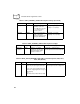



Table Of Contents
- Cover
- About This Guide
- Chapter 1 Getting Started
- Chapter 2 Hardware Setup
- Chapter 3 Software Installation
- Chapter 4 Operating the SPS 3000
- Chapter 5 Developing Applications for the SPS 3000
- Chapter 6 Maintenance, Troubleshooting, and Technical Specifications
- Appendix A Resetting the iPAQ
- Appendix B Registry Keys
- Index

B-1
Appendix B
Registry Keys
Table B-1. HKEY_CURRENT_USER\Software\Symbol\Settings
Value Type Description Example(s)
ScanApp String Sets the “registered”
scanning application
automatically launched by
the Trigger application. The
value should be set to a
“<Registered Application
Shortname>”.
“ScanApp” = “ScanWedge”
TriggerButton DWORD Sets a user prompt during
installation of the scan
driver CAB file. If a prompt
is set a dialog asks for the
application button to be
used as a hard trigger.
“TriggerButton” = 0 (prompt)
“TriggerButton” = 1 (no prompt)
ScanAppLaunch DWORD Sets a user prompt during
installation of the scan
driver CAB file. If a prompt
is set, a dialog asks for the
scanning application to
launch automatically when
the hard trigger is pressed
(and no scanning
application has a read
pending).
“ScanAppLaunch” = 0 (prompt)
“ScanAppLaunch” = 1 (no prompt)