
Scanner Programmer's Guide
Table Of Contents
- Cover
- About This Guide
- Chapter 1 Getting Started
- Chapter 2 Hardware Setup
- Chapter 3 Software Installation
- Chapter 4 Operating the SPS 3000
- Chapter 5 Developing Applications for the SPS 3000
- Chapter 6 Maintenance, Troubleshooting, and Technical Specifications
- Appendix A Resetting the iPAQ
- Appendix B Registry Keys
- Index
4-10
SPS 3000 Series Programmer’s Guide
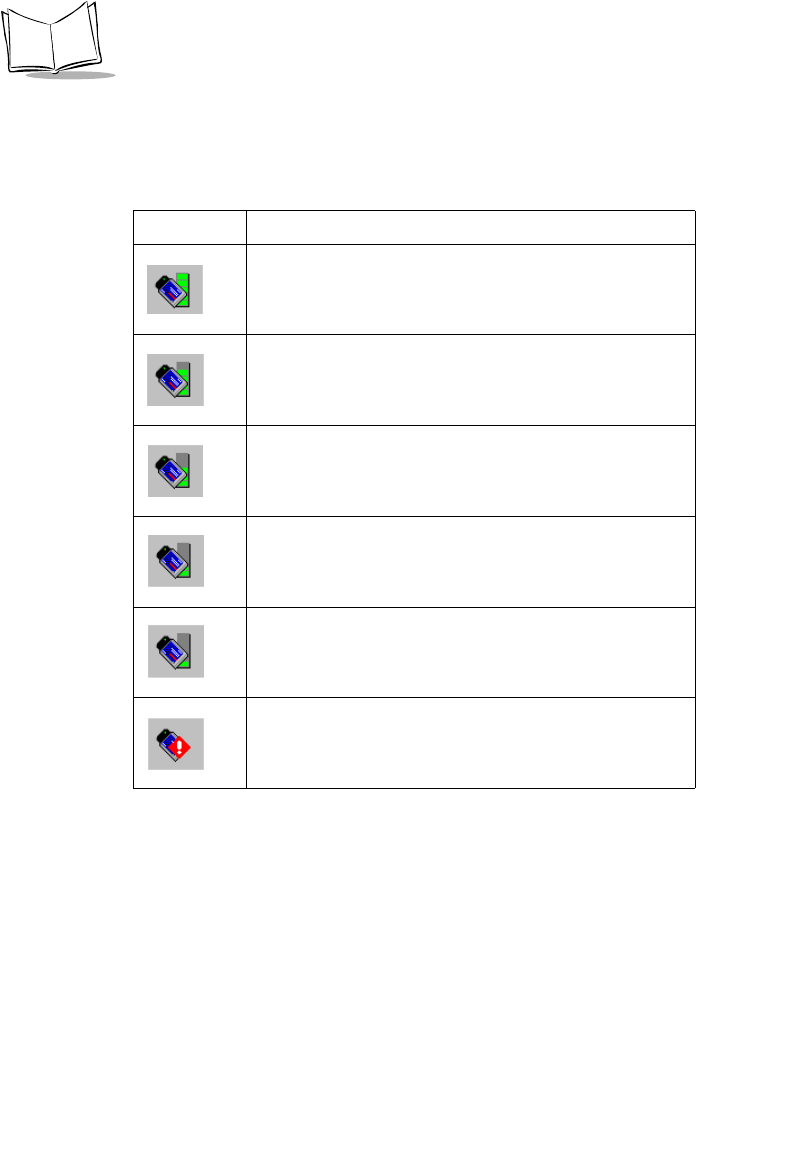
Symbol Status Task Tray Icons
Symbol Status task tray icons display the signal strength of the Wireless Networker.
Table 4-1. Symbol Status Task Tray Icons
ICON Status
Excellent signal strength (Green Bar)
Very good signal strength
Good signal strength
Fair signal strength
Poor signal strength
Out-of-network range