
Scanner Programmer's Guide
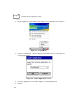
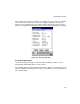
Table Of Contents
- Cover
- About This Guide
- Chapter 1 Getting Started
- Chapter 2 Hardware Setup
- Chapter 3 Software Installation
- Chapter 4 Operating the SPS 3000
- Chapter 5 Developing Applications for the SPS 3000
- Chapter 6 Maintenance, Troubleshooting, and Technical Specifications
- Appendix A Resetting the iPAQ
- Appendix B Registry Keys
- Index

4-5
Operating the SPS 3000
For more information about registering scanning applications for use with Trigger, refer to
Chapter 5, Developing Applications for the SPS 3000.
CTLPanel "Symbol Control Panel" Application
The CTLPanel Application provides the user with an interface for setting scan parameters.
You can access a shortcut to the CTLPanel program by tapping Start\Programs\Scanner.
CTLPanel is a menu driven application that allows for quick navigation of the many scan
parameters provided by the scan drivers. For more information about the scan parameters
and what they do, refer to the SPS 3000 Help file.