
Scanner Programmer's Guide
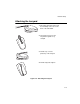

Table Of Contents
- Cover
- About This Guide
- Chapter 1 Getting Started
- Chapter 2 Hardware Setup
- Chapter 3 Software Installation
- Chapter 4 Operating the SPS 3000
- Chapter 5 Developing Applications for the SPS 3000
- Chapter 6 Maintenance, Troubleshooting, and Technical Specifications
- Appendix A Resetting the iPAQ
- Appendix B Registry Keys
- Index

2-9
Hardware Setup
Attaching the Lanyard
Figure 2-8. Attaching the Lanyard
1. Thread the lanyard loop through
the handstrap connector on the
back of the SPS 3000.
2. Thread the long end of the
lanyard through the loop
and pull.
3. Pull the loop over the
plastic tip on the lanyard.
4. Pull the lanyard to tighten.