
Scanner Programmer's Guide

Table Of Contents
- Cover
- About This Guide
- Chapter 1 Getting Started
- Chapter 2 Hardware Setup
- Chapter 3 Software Installation
- Chapter 4 Operating the SPS 3000
- Chapter 5 Developing Applications for the SPS 3000
- Chapter 6 Maintenance, Troubleshooting, and Technical Specifications
- Appendix A Resetting the iPAQ
- Appendix B Registry Keys
- Index
2-1
Chapter 2
Hardware Setup
Introduction
This chapter describes how to insert the iPAQ into the SPS 3000, remove the iPAQ from
the SPS 3000, insert the units into the cradle, charge batteries, check battery power, and
attach the lanyard.
Inserting the iPAQ into the SPS 3000
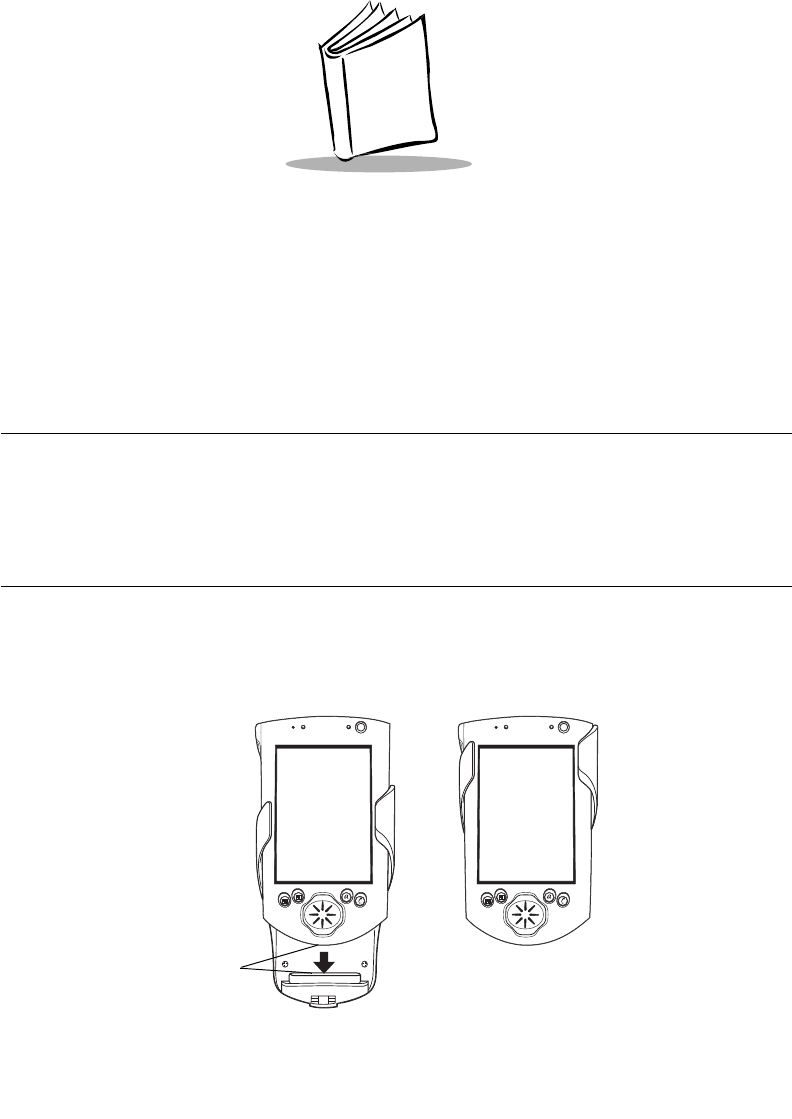
1. Slide the iPAQ through the SPS 3000 sleeves to connect the iPAQ and SPS 3000
expansion connectors (see Figure 2-1).
2. The iPAQ and SPS 3000 are connected when their expansion connectors are fully
engaged. (When the expansion connectors engage, you will hear a slight click.)
Figure 2-1. Inserting the iPAQ into the SPS 3000
Expansion Connectors