
Scanner Programmer's Guide

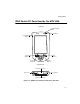
Table Of Contents
- Cover
- About This Guide
- Chapter 1 Getting Started
- Chapter 2 Hardware Setup
- Chapter 3 Software Installation
- Chapter 4 Operating the SPS 3000
- Chapter 5 Developing Applications for the SPS 3000
- Chapter 6 Maintenance, Troubleshooting, and Technical Specifications
- Appendix A Resetting the iPAQ
- Appendix B Registry Keys
- Index
1-3
Getting Started
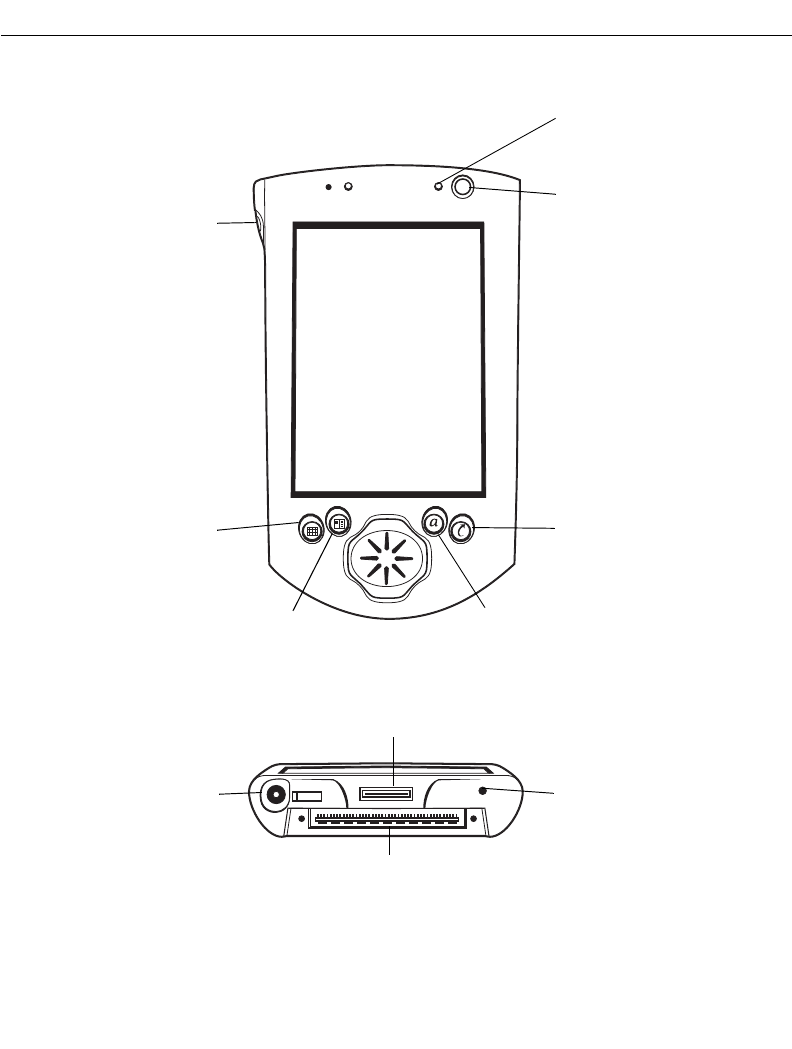
iPAQ Pocket PC Parts Used by the SPS 3000
Figure 1-2. iPAQ Pocket PC Parts Used by the SPS 3000
Front View
Power Button
Q Start
(Button 4)
Q Menu
(Button 3)
Reset Button
Bottom View
Communications Port
Calendar
(Button 1)
Contacts
(Button 2)
Power Jack
Record Button
(Button 5)
Expansion Connector
Amber Charging
LED