
Scanner Programmer's Guide

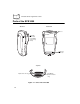
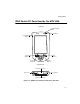
Table Of Contents
- Cover
- About This Guide
- Chapter 1 Getting Started
- Chapter 2 Hardware Setup
- Chapter 3 Software Installation
- Chapter 4 Operating the SPS 3000
- Chapter 5 Developing Applications for the SPS 3000
- Chapter 6 Maintenance, Troubleshooting, and Technical Specifications
- Appendix A Resetting the iPAQ
- Appendix B Registry Keys
- Index

1-1
Chapter 1
Getting Started
Introduction
This chapter describes how to unpack your SPS 3000, lists accessories and system
requirements, and describes the parts on your SPS 3000 and the physical buttons and
controls on the iPAQ Pocket PC used by the SPS 3000.
Unpacking the SPS 3000
Carefully remove all protective material from around the SPS 3000 and save the shipping
container for later storage and shipping.
Verify that you received all equipment listed on the packing slip and inspect the equipment
for damage. If you are missing any equipment or if you find any damaged equipment,
contact the Symbol Technologies Support Center immediately. See page x for contact
information.