
User Manual


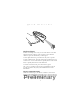



Table Of Contents
Preliminary
1
Quick Reference
Introduction
The Phaser P 370/470 Radio Frequency (RF) scanner brings new
flexibility and economy to data capture and data management in
retail operations. The RF scanner has an integrated keypad and
display, communicates with a base station and is battery-powered.
This provides advanced point-of-sale scanning and also allows the
scanner to be used for other in-store tasks such as delivery,
inventory, pricing, and even gift registry. There are two versions
available:
• P 470: the RF retail version
• P 370: the RF industrial version
This
Quick Reference Guide
provides basic instruction on the set up
and use of the scanner. Unless otherwise noted, the term Phaser
refers to both versions of the scanner.
Charge the Battery
Before its first use, the battery must be charged. After the base/
charger has been connected, insert the scanner into the base/charger.
To charge the scanner, place it front-side down into the base/charger.
Make sure that the contacts in the bottom of the scanner match up
with the metal contacts.