
2012
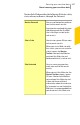
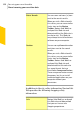
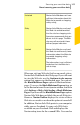
Table Of Contents
- Norton™ Internet Security Product Manual
- Contents
- 1. Getting started
- 2. Monitoring your system's performance
- 3. Protecting your files and data
- 4. Responding to security issues
- 5. Protecting Internet activities
- 6. Securing your sensitive data
- 7. Monitoring protection features
- 8. Customizing protection features
- 9. Finding additional solutions
- Index

Norton Safe Web does not have
sufficient information about this
Web site to provide a shopping
safety rating.
Untested
Norton Safe Web has analyzed
this Web site and determined
that the site has shopping risks.
Symantec recommends that you
do not visit this page. The Web
site may sell counterfeit items
without proper indication.
Risky
Norton Safe Web has analyzed
this Web site and has only some
information about the Web site
to provide shopping safety
information.
The information is not sufficient
to declare that the Web site is
safe to shop.
Limited
When you visit any Web site that has an unsafe status,
Norton Safe Web blocks that Web page. If you still want
to view the Web site, use the Continue to site anyway
option that appears on the blocked page. You can use
the Block Malicious Pages option to block malicious
pages. To access the Block Malicious Pages option, go
to the Norton Internet Securitymain window, and then
click Settings > Web > Safe Surfing > Block Malicious
Pages. If you turn off the Block MaliciousPages option,
Norton Safe Web does not block the unsafe Web sites.
However, Norton Toolbar displays the status of these
Web sites as unsafe even when the option is turned off.
In addition, Norton Safe Web protects your computer
while you use Facebook. It scans each URL that is
available on your Facebook Wall and displays the
Norton rating icons for the scanned URLs. You can also
309Securing your sensitive data
About securing your sensitive data