
2012
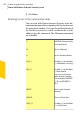
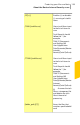
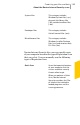
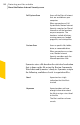
Table Of Contents
- Norton™ Internet Security Product Manual
- Contents
- 1. Getting started
- 2. Monitoring your system's performance
- 3. Protecting your files and data
- 4. Responding to security issues
- 5. Protecting Internet activities
- 6. Securing your sensitive data
- 7. Monitoring protection features
- 8. Customizing protection features
- 9. Finding additional solutions
- Index

5
Click Save.
Running a scan at the command prompt
You can scan with Norton Internet Security from the
command prompt without opening the Norton Internet
Security main window. You type the path and name of
the file that you want to scan or customize the scan by
adding a specific command. The following commands
are available:
NAVW32 launches help
and terminates.
/?
Scans all drives/A
Scans the local drives/L
Enables (+) or disables
(-) subfolders scanning
/S[+|-]
Enables (+) or disables
(-) boot record
scanning and master
boot record scanning
(for example, NAVW32
C: /B+ or NAVW32 C:
/B-)
/B[+|-]
Scans only the boot
records
/BOOT
Runs a Quick Scan/QUICK
Enables (+) or disables
(-) a Quick Scan
/SE[+|-]
Protecting your files and data
About the Norton Internet Security scans
132