
User's Manual





38 EN
SATELLITE LINK
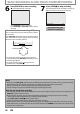
7
Press [ENTER].
“To Standby Mode” is highlighted.
8
Press [ENTER] again.
Satellite Link
Start Speed
5:00PM 2H
To Standby Mode
In a second, the unit will be turned off
automatically as it goes into the satellite link
standby mode.
To cancel the satellite link function while in
the satellite link standby mode:
Press [POWER] to turn on the unit.
To cancel the satellite link function while the
satellite link recording is in progress:
Press [STOP C] on the front panel of the unit.
Note
• If the signal of external input breaks up over 5 seconds, satellite link function will be canceled.
• If you have not set the clock, “Clock Setting” menu will appear at step 3. Follow to step 3 in “Clock Setting” on
page 22.
• You cannot set the end time for the satellite link timer recording on this unit.
• Recording picture will be distorted if the copy protection signal is being detected during satellite link timer
recording.
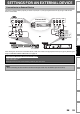
• You can record the satellite link by using S-video input jacks on the rear panel. Refer to page 39 for more
information.
• When a regular timer recording and the satellite link timer recording are overlapped, those recordings are
recorded as illustrated below.
• Press [TIMER PROG.] during the satellite link timer recording to check the satellite link timer recording in
progress.
example 2
actual
recording
timer
recording
satellite link
example 3
actual
recording
timer
recording
satellite link
The rst 2 minutes (at the longest) will be cut o.
example 1
timer
recording
actual
recording
satellite link
The rst 2 minutes (at the longest) will be cut o.