
User's Manual





30 EN
INFORMATION ON DVD RECORDING
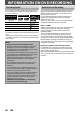
You can select a recording speed among 5 options, and
the recording time will depend on the recording speed
you select as follows.
Recording speed
Recording time
Video/
sound quality
12cm 8cm
XP / 1H 60 min 18 min
SP / 2H 120 min 36 min
LP / 4H 240 min 72 min
EP / 6H 360 min 108 min
SLP / 8H 480 min 144 min
• The recording times listed above are estimates and are
for reference purposes only. Actual recording times may
vary.
• The audio and video quality of content being recorded
may differ depending on the recording speed/recording
time chosen.
Recording Speed
You cannot record copy-protected video using this unit.
Copy-protected video includes DVD-videos and some
satellite broadcasts, some pay-per-view stations and
some “premium” stations.
If copy-protected material is detected, recording will
pause or stop automatically and an error message
appears on the screen.
“Copy-once only” video can only be recorded to CPRM
compatible DVD-RW formatted in VR mode.
What is “CPRM”?
CPRM is a copy protection system with scramble system
regarding the recording of “copy-once” broadcast
programs. CPRM stands for Content Protection for
Recordable Media.
This unit is CPRM compatible, which means that you
can record copy-once broadcast programs, but you
cannot make another copy of those recordings. CPRM
recordings can only be made on CPRM compatible DVD-
RW formatted in VR mode, and CPRM recordings can
only be played back on DVD players that are specifically
compatible with CPRM.
Making discs playable in other DVD players(Finalize)
For DVD-RW/-R, it is necessary to finalize the disc after
recording, in order to play back the disc on other DVD
players. (Refer to pages 27-29.)
When video mode DVD-RW or DVD-R are finalized, a DVD
menu is created. You cannot finalize discs in other DVD
recorders.
Restrictions on Recording
Note
• This unit cannot record to CD-RW or CD-R.
• DVD-RW/-R and CD-RW/-R recorded on a personal
computer or a DVD or CD recorder may not be
played back if the disc is damaged or dirty or if there
is condensation on the player’s lens.
• If you record a disc using a personal computer, even
if it is recorded in a compatible format it may not be
played back because of the settings of the
application software used to create the disc. (Check
with the software publisher for more detailed
information.)
• Discs recorded in video mode on this unit cannot
record additional information using other DVD
recorders.
• It is not possible to use a DVD-RW formatted with
this unit on other DVD recorder unless the content of
the disc was also recorded with this unit.
• Since the recording is made by the VBR (variable bit
rate) method, depending on the picture you are
recording, the actual remaining time for recording
may be a little shorter than the remaining time
displayed on the TV screen.
• “Make Recording Compatible” in “Recording”
menu does not work on this unit.