
User`s manual

4-6
C7Q67 User's Manual
Note: If there is any change to this setting, you will need to power off and
restart the system for the change to take effect. Please refer to Intel’s
web site for detailed information.
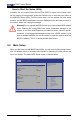
Execute-Disable Bit Capability (Available when supported by the OS and
the CPU)
Set to Enabled to enable the Execute Disable Bit which will allow the processor
to designate areas in the system memory where an application code can execute
and where it cannot, thus preventing a worm or a virus from ooding illegal codes
to overwhelm the processor or damage the system during an attack. The default is
Enabled. (Refer to Intel and Microsoft Web Sites for more information.)
Intel® Hyper Threading Technology (Available when supported by the OS
and the CPU)
Select Enabled to enable Hyper_Threading support to increase CPU performance.
The options are Enabled and Disabled.
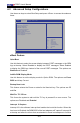
Active Processor Cores
Set to Enabled to use a processor's Second Core and beyond. (Please refer to
Intel's web site for more information.) The options are All, 1, 2 and 3.
Power Technology
Use this feature to select a power-saving scheme for the motherboard. The options
are Disabled, Energy Efcient and Custom. If Custom is selected, the following
options become available:
EIST
EIST (Enhanced Intel SpeedStep Technology) allows the system to automati-
cally adjust processor voltage and core frequency in an effort to reduce power
consumption and heat dissipation. Please refer to Intel’s web site for detailed
information. The options are Disabled and Enabled.
P-STATE Coordination
This feature selects the type of coordination for the P-State of the processor.
P-State is a processor operational state that reduces the processor's voltage and
frequency. This makes the processor more energy efcient, resulting in further
energy gains. The options are HW_ALL, SW_ALL and SW-ANY.
CPU C3 Report
Select Enabled for the CPU to report C3 (ACPI C2) state to the operating system.
The options are Disabled and Enabled.