
User`s manual

4-4
C7Q67 User's Manual
4-3 AdvancedSetupCongurations
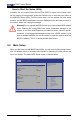
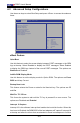
Use the arrow keys to select Boot Setup and press <Enter> to access the submenu
items:
Boot Feature
Quiet Boot
Use this feature to select the screen display between POST messages or the OEM
logo at bootup. Select Disabled to display the POST messages. Select Enabled
to display the OEM logo instead of the normal POST messages. The options are
Enabled and Disabled.
AddOn ROM Display Mode
Use this feature to set the display mode for Option ROM. The options are Force
BIOS and Keep Current.
Bootup Num-Lock
This feature selects the Power-on state for the Numlock key. The options are Off
and On.
Wait For 'F1' If Error
This forces the system to wait until the 'F1' key is pressed if an error occurs. The
options are Disabled and Enabled.
Interrupt 19 Capture
Interrupt 19 is the software interrupt that handles the boot disk function. When this
item is set to Enabled, the ROM BIOS of the host adaptors will "capture" Interrupt 19
at bootup and allow the drives that are attached to these host adaptors to function
Aptio Setup Utility - Copyright (C) 2010 American Megatrends, Inc.
Main Advanced Security Boot Exit
: Select Screen
: Select Item
Enter: Select
+/- : Change Opt.
F1 : General Help
F2 : Previous Values
F3 : Optimized Defaults
F4 : Save & Exit
ESC : Exit
Version 2.10.1206. Copyright (C) 2010 American Megatrends, Inc.
System Boot Feature Setting.
Boot Feature
Processor & Clock Options
Chipset Conguration
IDE/SATA Conguration
PCIe/PCI/PnP Conguration
Super IO Conguration
Hardware Health Conguration
ACPI Conguration
Trusted Computing Conguration
AMT Conguration