
User`s manual







9-11
Chapter 9: MegaRAID Window and Menus
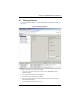
3. In the SUMMARY screen (Figure 9-7) that appears review your settings, and when
satisfied, press the F
INISH button.
If you wish to change your settings, press the BACK button to go to the previous
C
REATE VIRTUAL DRIVE–DRIVE GROUP AND VIRTUAL DRIVE SETTINGS screen and
change them.
Figure 9-7. Advanced Configuration Summary Screen