
User's Manual

port.
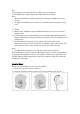
2) Charging will start automatically with LED indicator turning red
3) The headphones is fully charged when LED indicator turns blue
Note:
Make sure the battery is fully charged before putting the headphones away for
storage.
Charge the headphones at least once every 3 months when not using for a long
time.
2. Pairing
1) Make sure the headphones and your Bluetooth® device are next to each other
(within 3 feet);
2) The first time you use the headphones, press and hold the Multifunction Button
until the LED indicator flashes red and blue alternately. Now the headphones is in
pairing mode;
3) Activate Bluetooth® function on your phone and search for the nearby
Bluetooth® connection: Find “TaoTronics TT-BH024” in the search results. Tap
on the name to connect. Once connected, only the blue LED will flash.
Note:
The Bluetooth® headphones can remember previous paired devices.
If the headphones cannot pair with your Bluetooth® device, clear the pairing history
by pressing and holding the Volume + and Volume - Buttons at the same time until
the LED Indicator flashes purple twice and 2 beep sound are heard.Then restart the
headphones to pair again.
How to Wear
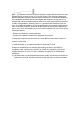
Please wear the headphones as shown in the diagram:
1) Attach the ear hooks onto the earphones;
2) Wear the earphones and the hooks on your ears and adjust for the best fit.