
Operation Manual





7VR2 Contoller Rev.A
ENGLISH
Part Function
A. Joystick In the ´drive´ mode: driving and steering
In the ‘adjustment options’ mode:
• Left/right to select the adjustment options
• Front/back to select the adjustment mode
B. On/off switch Switching the controller on or off
C. Horn Warning signal with sound
D. 1 Battery indicator Displays the power level of the battery
D.2 Maximum speed Displays the maximum speed limit as set by the user
D.3 Adjustment option Displays the selected adjustment options
E. “Mode” button Changing between the ‘driving’ and the ‘adjustment options’
mode
F. 1 Speed regulator Reduce driving speed (slower)
F. 2 Speed regulator Increase driving speed (faster)
G. Charge connector Input for the battery charger
H. Charge plug for the battery
charger
Connector for the battery charger
I. Lights button Switching the lights on or off
J. Hazard lights Warning signal with lights
K. 1 Direction indicator left Switches the left direction indicator on or off
K.2 Direction indicator right Switches the right direction indicator on or off
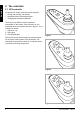
Figure 4 From the left to the right ; VR2 drive only, VR2 Lights, VR2 Seats & Lights
H
A
B
C
D2
F1 F2
D1
D2
F1 F2
B
C
J
D1
I
F1 F2
K1 K2 K1 K2
D2
B
C
J
D1
I
D3
E
G