
User Guide


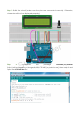


Note: After you run the code, characters may not appear on the LCD1602. You need
to adjust the contrast of the screen (the gradual change from black to white) by
spinning the potentiometer clockwise or anticlockwise, until the screen displays
characters clearly.
Step 2: Transfer the package LCD1602_for_Raspberry_Pi
[http://wiki.sunfounder.cc/images/8/87/LCD1602_for_Raspberry_Pi.zip] to the
Raspberry Pi
wget http://wiki.sunfounder.cc/images/8/87/LCD1602_for_Raspberry_Pi.zip
Step 3: Extract the package
unzip LCD1602_for_Raspberry_Pi.zip
(For C Language Users)
Step 4: Get into the folder of code
cd LCD1602_for_Raspberry_Pi/C
Step 5: Compile
gcc lcd1602.c –o lcd1602 –lwiringPiDev –lwiringPi
Step 6: Run
sudo ./lcd1602
(For Python Users)
Step 4: Get into the folder of code
cd LCD1602_for_Raspberry_Pi/Python
Step 5: Run
sudo python lcd1602.py
SunFounder