
Server Module Installation Guide
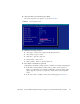
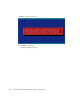

Table Of Contents
- Sun Blade™ X6450 Server Module Installation Guide
- Contents
- Preface
- Introduction
- Installing and Configuring the Server Module
- Installation Worksheet
- Using the BIOS Configuration Utility to Configure the Sun Blade RAID 5 Expansion Module
- Introduction to the BIOS RAID Configuration Utility
- Understanding Hot-Plug Limitations and Conditions Within the BIOS RAID Configuration Utility
- Running the BIOS RAID Configuration Utility
- Using the ACU to Create and Manage Arrays
- Using the -Select Utility to Modify REM Settings
- Using the Disk Utilities to Manage Disk Drives
- Initializing a RAID Array
- Index

Appendix B Using the BIOS Configuration Utility to Configure the Sun Blade RAID 5 Expansion Module 61
10. After you make your selections, press Enter.
The Array Properties view appears, as shown in
FIGURE B-6.
FIGURE B-6 Array Properties View
11. Make the following selections:
■ Array Type – Select an array type from the drop-down list.
■ Array Label – Type in a label.
■ Stripe Size – Type in a stripe size.
■ Read Caching – Type Y or N.
■ Write Caching – Select an option from the list.
12. Press Enter or click Done to proceed.
Depending on the Write Caching selection, a number of warnings might appear:
■ If the Write Caching setting is Enable Always, and if you do not have a
battery, or if the battery is not charged sufficiently, several warnings might
appear. Type Yes to proceed, or type No to return to the Array Properties
screen.
■ If the write cache is enabled, a write cache warning appears (FIGURE B-7).