
Server Module Installation Guide
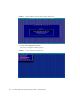
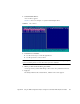
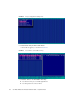
Table Of Contents
- Sun Blade™ X6450 Server Module Installation Guide
- Contents
- Preface
- Introduction
- Installing and Configuring the Server Module
- Installation Worksheet
- Using the BIOS Configuration Utility to Configure the Sun Blade RAID 5 Expansion Module
- Introduction to the BIOS RAID Configuration Utility
- Understanding Hot-Plug Limitations and Conditions Within the BIOS RAID Configuration Utility
- Running the BIOS RAID Configuration Utility
- Using the ACU to Create and Manage Arrays
- Using the -Select Utility to Modify REM Settings
- Using the Disk Utilities to Manage Disk Drives
- Initializing a RAID Array
- Index

60 Sun Blade X6450 Server Module Installation Guide • September 2008
FIGURE B-4 Array Configuration Utility View
8. Select Create Array from the main menu.
A list of drives appears, as shown in
FIGURE B-5.
FIGURE B-5 List of Drives to Include in Array
9. Select the drives to be included in the array.
■ Use the arrow keys to scroll through the list.
■ Use the space bar to select a drive.