
Server Module Installation Guide
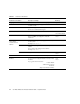
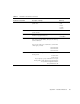
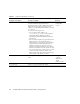
Table Of Contents
- Sun Blade™ X6450 Server Module Installation Guide
- Contents
- Preface
- Introduction
- Installing and Configuring the Server Module
- Installation Worksheet
- Using the BIOS Configuration Utility to Configure the Sun Blade RAID 5 Expansion Module
- Introduction to the BIOS RAID Configuration Utility
- Understanding Hot-Plug Limitations and Conditions Within the BIOS RAID Configuration Utility
- Running the BIOS RAID Configuration Utility
- Using the ACU to Create and Manage Arrays
- Using the -Select Utility to Modify REM Settings
- Using the Disk Utilities to Manage Disk Drives
- Initializing a RAID Array
- Index

44 Sun Blade X6450 Server Module Installation Guide • September 2008
Default route Do you want to specify a default route IP address,
or let the installation program find one?
The default route provides a bridge that forwards
traffic between two physical networks. An IP
address is a unique number that identifies each host
on a network.
You have the following choices:
• You can specify the IP address. An
/etc/defaultrouter file is created with the
specified IP address. When the system is
rebooted, the specified IP address becomes the
default route.
• You can let the installation program detect an IP
address. However, the system must be on a
subnet that has a router that advertises itself by
using the Internet Control Message Protocol
(ICMP) router discovery protocol. If you are
using the command-line interface, the software
detects an IP address when the system is booted.
• You can choose None if you do not have a router
or do not want the software to detect an IP
address at this time. The software automatically
tries to detect an IP address on reboot.
• Specify One
• Detect One
• None*
Time zone How do you want to specify your default time
zone?
• Geographic
region*
• Offset from
GMT
• Time zone file
Root password Choose a root password for the system.
TABLE A-1 Installation Worksheet (Continued)
Information for Installation Description or Example
Your Answers:
Defaults (*)