
Server Module Installation Guide
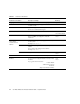
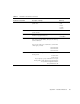
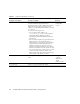
Table Of Contents
- Sun Blade™ X6450 Server Module Installation Guide
- Contents
- Preface
- Introduction
- Installing and Configuring the Server Module
- Installation Worksheet
- Using the BIOS Configuration Utility to Configure the Sun Blade RAID 5 Expansion Module
- Introduction to the BIOS RAID Configuration Utility
- Understanding Hot-Plug Limitations and Conditions Within the BIOS RAID Configuration Utility
- Running the BIOS RAID Configuration Utility
- Using the ACU to Create and Manage Arrays
- Using the -Select Utility to Modify REM Settings
- Using the Disk Utilities to Manage Disk Drives
- Initializing a RAID Array
- Index

Appendix A Installation Worksheet 43
Name service Name service If applicable, which name service should this
system use?
• NIS+
• NIS
• DNS
• LDAP
• None*
Domain name Provide the name of the domain in which the
system resides.
NIS+ and NIS Do you want to specify a name server, or let the
installation program find one?
• Specify One
• Find One*
DNS Provide IP addresses for the DNS server. You must
enter at least one IP address, but you can enter up
to three addresses.
You can also enter a list of domains to search when
a DNS query is made.
Search Domain:
Search Domain:
Search Domain:
LDAP Provide the following information about your
LDAP profile:
Profile name:
Profile server:
If you specify a proxy credential level in your
LDAP profile, gather the following information:
Proxy-Bind Distinguished Name:
Proxy-Bind Password:
TABLE A-1 Installation Worksheet (Continued)
Information for Installation Description or Example
Your Answers:
Defaults (*)