
Server Module Installation Guide
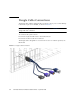

Table Of Contents
- Sun Blade™ X6450 Server Module Installation Guide
- Contents
- Preface
- Introduction
- Installing and Configuring the Server Module
- Installation Worksheet
- Using the BIOS Configuration Utility to Configure the Sun Blade RAID 5 Expansion Module
- Introduction to the BIOS RAID Configuration Utility
- Understanding Hot-Plug Limitations and Conditions Within the BIOS RAID Configuration Utility
- Running the BIOS RAID Configuration Utility
- Using the ACU to Create and Manage Arrays
- Using the -Select Utility to Modify REM Settings
- Using the Disk Utilities to Manage Disk Drives
- Initializing a RAID Array
- Index

38 Sun Blade X6450 Server Module Installation Guide • September 2008
Dongle Cable Connections
The dongle cable, which is shipped with your chassis, allows you to connect directly
to the front of your server module, as shown in
FIGURE 2-9.
Note – The dongle cable has either three of four connectors. FIGURE 2-9 shows a
dongle with four connectors.
To connect to the system console:
■ Connect a keyboard and mouse to the USB connector.
■ Connect a monitor to the VGA connector.
The dongle cable is designed for occasional service use. For routine operation, use
the ELOM.
FIGURE 2-9 Dongle Cable Connections
1
2
3
4