
Server Module Installation Guide
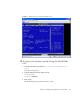

Table Of Contents
- Sun Blade™ X6450 Server Module Installation Guide
- Contents
- Preface
- Introduction
- Installing and Configuring the Server Module
- Installation Worksheet
- Using the BIOS Configuration Utility to Configure the Sun Blade RAID 5 Expansion Module
- Introduction to the BIOS RAID Configuration Utility
- Understanding Hot-Plug Limitations and Conditions Within the BIOS RAID Configuration Utility
- Running the BIOS RAID Configuration Utility
- Using the ACU to Create and Manage Arrays
- Using the -Select Utility to Modify REM Settings
- Using the Disk Utilities to Manage Disk Drives
- Initializing a RAID Array
- Index

Chapter 2 Installing and Configuring the Server Module 37
FIGURE 2-8 Selections forBooting the Operating System
8. Use the arrow keys to scroll through the list, then press Enter.
Note – This example shows a server with the Solaris OS installed. On servers with
different operating systems, the selections will change accordingly. See The Sun
Blade X6450 Operating System Installation Guide or the Sun Blade X6450 Windows
Operating System Installation Guide for details on different operating systems.