
Server Module Installation Guide
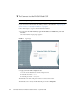
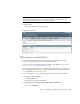
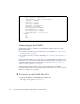
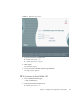
Table Of Contents
- Sun Blade™ X6450 Server Module Installation Guide
- Contents
- Preface
- Introduction
- Installing and Configuring the Server Module
- Installation Worksheet
- Using the BIOS Configuration Utility to Configure the Sun Blade RAID 5 Expansion Module
- Introduction to the BIOS RAID Configuration Utility
- Understanding Hot-Plug Limitations and Conditions Within the BIOS RAID Configuration Utility
- Running the BIOS RAID Configuration Utility
- Using the ACU to Create and Manage Arrays
- Using the -Select Utility to Modify REM Settings
- Using the Disk Utilities to Manage Disk Drives
- Initializing a RAID Array
- Index

Chapter 2 Installing and Configuring the Server Module 29
FIGURE 2-4 Web GUI Login Screen
2. Type the user name and password.
■ Default user name: root
■ Default password: changeme
3. Click Login.
The web GUI appears.
4. To log out of the web GUI, click the Logout button.
The logout screen appears.
▼ To Connect to the ELOM CLI
1. From a terminal window, type:
$ ssh root@IPaddress
2. Type the user name and password.
■ Default user name: root