
Server Module Installation Guide
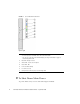
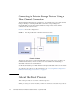
Table Of Contents
- Sun Blade™ X6450 Server Module Installation Guide
- Contents
- Preface
- Introduction
- Installing and Configuring the Server Module
- Installation Worksheet
- Using the BIOS Configuration Utility to Configure the Sun Blade RAID 5 Expansion Module
- Introduction to the BIOS RAID Configuration Utility
- Understanding Hot-Plug Limitations and Conditions Within the BIOS RAID Configuration Utility
- Running the BIOS RAID Configuration Utility
- Using the ACU to Create and Manage Arrays
- Using the -Select Utility to Modify REM Settings
- Using the Disk Utilities to Manage Disk Drives
- Initializing a RAID Array
- Index

10 Sun Blade X6450 Server Module Installation Guide • September 2008
Connecting to Exterior Storage Devices Using a
Fibre Channel Connection
The Sun Blade X6450 supports connections to an external SAN over a fibre channel
link provided by a PCIe ExpressModule card in the corresponding PCIe
ExpressModule slot. The PCIe ExpressModule card provides a fibre channel
connection to the external SAN.
FIGURE 1-3 shows the configuration.
FIGURE 1-3 PCIe ExpressModule with Fibre Channel and SAN
The chassis supports two PCIe ExpressModule slots for each server slot. They are
numbered N-0 and N-1, where N is the server slot number. The numbering is
described in the chassis documentation.
See the documentation provided with the PCIe ExpressModule card for more details.
To configure a boot device on the SAN device, see “Accessing BIOS Configuration
Utilities and Selecting a Boot Device” on page 13.
About the Boot Process
This section provides an overview of the boot process.
When you start your server module, it offers two chances to select the way it boots: