
Server Module Installation Guide
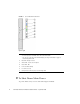
Table Of Contents
- Sun Blade™ X6450 Server Module Installation Guide
- Contents
- Preface
- Introduction
- Installing and Configuring the Server Module
- Installation Worksheet
- Using the BIOS Configuration Utility to Configure the Sun Blade RAID 5 Expansion Module
- Introduction to the BIOS RAID Configuration Utility
- Understanding Hot-Plug Limitations and Conditions Within the BIOS RAID Configuration Utility
- Running the BIOS RAID Configuration Utility
- Using the ACU to Create and Manage Arrays
- Using the -Select Utility to Modify REM Settings
- Using the Disk Utilities to Manage Disk Drives
- Initializing a RAID Array
- Index

4 Sun Blade X6450 Server Module Installation Guide • September 2008
FIGURE 1-1 Server Module Front Panel
Figure Leg end
▼ To Shut Down Main Power
To power off the server, use one of the following two methods:
1 White LED - Locate
- A service processor command causes the locate LED to blink.
- You can also control the locate LED manually by pressing it momentarily to toggle its
state, turning it On or Off.
2 Blue LED - Ready to remove
3 Amber LED - Service action required
4 Green LED - OK
5 Power on button/standby
6 For service use only
7 UCP (universal connector port), used for dongle cable