
Computer Accessories User Manual


32 Netra ft 1800 Installation Guide • February 1999
▼ To Replace the RMM
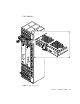
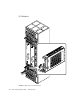
1. Slide the RMM into its slot until it is almost completely home.
A module will not fit into a slot designed for a different class of module.
2. Lower the handle to engage the RMM fully in its slot.
3. Slide the latch in the handle to the right (towards the ‘locked’ symbol).
Replacing a Disk Chassis
DSK modules have a slide on an ejector handle. The handle is lifted to disengage the
module physically, and lowered to engage it.
▼ To Remove the Disk Chassis
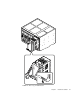
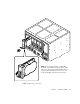
1. Remove any HDD modules (hard disks) in the disk chassis.
Refer to
FIGURE 2-17 on page 33.
Caution – Always remove all hard disk drive modules before removing a disk
chassis. Always put a hard disk back in the same location from which you removed
it.
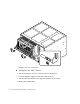
2. Slide the latch in the handle of the disk chassis to the left (towards the ‘unlocked’
symbol).
3. Lift the handle.
4. Slide the disk chassis out of its slot.