
User Guide

Default Virtual Server
Virtual servers work using the HTTP 1.1 Host header. If the end user’s browser does not send
the Host header, or if the server cannot nd the virtual server specied by the Host header, Web
Server handles the request using a default virtual server. You can congure the default virtual
server to send an error message or serve pages from a special document root.
Tuning
This setting is tunable when you edit an HTTP listener.
Keep-Alive Information
This section provides information about the server’s HTTP-level keep-alive system.
Note – The name keep alive should not be confused with TCP keep-alives. Also, note that the
name keep-alive was changed to PersistentConnections in HTTP 1.1, but Web Server
continues to refer to them as keep-alive connections.
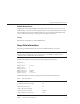
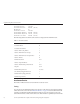
The following example shows the keep-alive statistics displayed by perfdump:
KeepAliveInfo:
--------------------
KeepAliveCount 198/200
KeepAliveHits 0
KeepAliveFlushes 0
KeepAliveRefusals 56844280
KeepAliveTimeouts 365589
KeepAliveTimeout 10 seconds
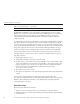
The following table shows the keep-alive statistics displayed in the Admin Console:
TABLE 2–3 Keep-Alive Statistics
Number of Connections Processed 0
Total Number of Connections Added 198
Maximum Connection Size 200
Number of Connections Flushed 0
Number of Connections Refused 56844280
Number of Idle Connections Closed 365589
Using Monitoring Data to TuneYour Server
Chapter 2 • Tuning Sun Java System Web Server 53