
Server User Manual
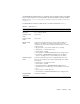

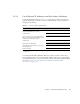
Table Of Contents
- Sun Netra™ CP3250 Blade Server User’s Guide
- Contents
- Figures
- Tables
- Preface
- Overview
- Hardware Installation and Service
- 2.1 Safety and Tool Requirements
- 2.2 Installing the Blade Server
- 2.3 Service Procedures
- 2.3.1 Hot-Swapping the Netra CP3250 Blade Server
- 2.3.2 Powering Off the Netra CP3250 Blade Server
- 2.3.3 Removing the Netra CP3250 Blade Server
- 2.3.4 Powering On the System
- 2.3.5 Automatic Power-Off Events
- 2.3.6 Servicing DIMMs
- 2.3.7 Installing the Optional Compact Flash Card
- 2.3.8 Installing Optional AMC
- 2.3.9 Adding or Replacing the Battery
- 2.3.10 Changing Jumper Settings
- 2.3.11 Checking DIP Switch Settings
- 2.3.12 Resetting the Netra CP3250 Blade Server
- Hardware Architecture
- Software Configuration
- Configuring and Using BIOS Firmware
- 5.1 About BIOS Settings
- 5.2 Changing the Configuration of a BIOS Menu Item
- 5.3 Setting the Boot Device Using BIOS Setup Screens
- 5.4 Setting Supervisor and User Passwords
- 5.5 Resetting the System Time and System Date
- 5.6 Updating the BIOS
- 5.7 Secondary BIOS Image
- 5.8 Perform a Live Firmware Upgrade
- 5.9 Power-On Self-Test
- 5.10 Changing POST Options
- BIOS Screens
- Physical Characteristics
- ShMM CLI and Commands
- Index

Chapter 2 Hardware Installation and Service 2-5
2.2.1.2 Local Network IP Addresses and Host Names Worksheet
Collect the information listed in TABLE 2-1 to connect hosts to the LAN. Ask your
network administrator for help, if necessary. This information is not needed for a
stand-alone installation.
You might need the MAC (Ethernet) addresses of the local hosts to make name
server database entries. You can see the MAC address in the console output while
booting the blade server. You can also find it on the barcode label on the node blade
server (see Section 1.7.1, “Locating the Part Number and Serial Number
Information” on page 1-13).
TABLE 2-1 Local Area Network Information
Information Needed Your Information
IP address
*
and host name for each Sun
Netra CP3250 blade server client
* Local IP addresses are not needed if they are assigned by a network Dynamic Host Configuration Protocol
(DHCP) server.
Domain name
Type of name service and corresponding
name server names and IP addresses—for
example DNS and NIS (or NIS+)
Subnet mask
Gateway router IP address
Network File System (NFS) server names
and IP addresses
Web server URL