
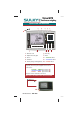
Quick set-up User guide


S
S
PREADING
PREADING
MENU
MENU
“EPAN”
“EPAN”
I
I
NFORMATION
NFORMATION
MENU
MENU
“INFO”
“INFO”
1
1
C
C
ALIBRATING
ALIBRATING
THE
THE
FERTILIZER
FERTILIZER
IN
IN
DYN
DYN
AMIC
AMIC
MODE
MODE
Á
Á
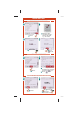
Select AUTO
mode
Á
Á
Press STOP during road
transport or when reload-
ing
Do not use DYNamic mode
when refilling with a mobile
hopper whilst moving
The DYNamic mode switches
to STOP when the hopper
level is < 200 kg.
P
P
RESENTATION
RESENTATION
OF
OF
THE
THE
INFO
INFO
MENU
MENU
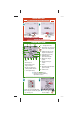
4 •
4 • Selection key for partial
(plot) or total (site)
spreading data
5 •
5 • Selection key for the num-
ber of hectares or number
of metres still to be spread
with the amount of
fertiliser remaining in the
hopper
6 •
6 • Selection key for data
saving function and
DGPS mode
7 •
7 • Active alarms information
key
8 •
8 • Reset key for the hectare
and tonnage counters
Á
Á
Select the
INFO
INFO menu to check the performance in
the site being spread.
4
4
5
5
2
2
6
6
8
8
1
1
3
3
7
7
1
1
•
• Number of tonnes spread
(theoretical)
2 •
2 • Surface area spread in
hectares (actual)
3 •
3 • Indicator showing the
number of hectares or
number of metres over
which fertiliser is still to be
spread
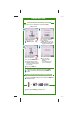
When spreading, the
calibration adjustment
(T-factor) is automatically
done.