
Quick set-up User guide


S
S
ETTINGS
ETTINGS
MENU
MENU
“REG”
“REG”
S
S
PREADING
PREADING
MENU
MENU
“EPAN”
“EPAN”
…
…
AND
AND
SELECTING
SELECTING
THE
THE
CALIBRATION
CALIBRATION
MODE
MODE
P
P
ROGRAMMING
ROGRAMMING
THE
THE
AMOUNT
AMOUNT
OF
OF
PRODUCT
PRODUCT
IN
IN
KG
KG
/
/
HA
HA
2
2
1
1
2
2
1
1
Á
Á
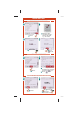
Select
to activate STAT mode
5
5
6
6
7
7
8
8
15
15
13
13
10
10
1
1
3
3
4
4
2
2
14
14
10
10
9
9
12
12
11
11
Á
Á
Enter the desired application
rate using the numeric key pad
e.g.: 150 kg / ha
Á
Á
Press enter
The value appears
on the display
Á
Á
Press
to exit.
NB: A
LWAYS START W ITH
STAT
F
F
ILLING
ILLING
THE
THE
TANK
TANK
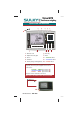
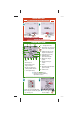
1
1
•
•
Time
2
2
•
•
Forward speed
3
3
•
•
Quantity to be spread
in kg per hectare
4 •
4 •
Electric rate adjustment
cylinder position indicator
5 •
5 •
+ 10% adjustment key
6 •
6 •
- 10% adjustment key
7 •
7 •
Return to the pre-set rate per
hectare after an adjustment
8 •
8 •
Tribord and “right” or “left”
adjustment selection key
9 •
9 •
Application rate test key
10 •
10 •
Hydraulic shutter
open/closed indicator
11 •
11 •
Weight in the hopper
(actual)
12 •
12 •
Programmed rate per
hectare
13 •
13 •
Alarm
14 •
14 •
Correction mode information:
dynamic or static
15 •
15 •
Fertilizer name
Á
Á
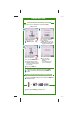
Select the
EPAN
EPAN menu
and carry out the following
operations in order