
Network Router User Manual

SCP-949 Operating Instructions!
5 STRUCTURED CABLE PRODUCTS
CONNECT AND OPERATION
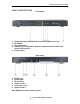
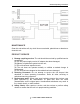
1) Connect the HDMI input sources (such as HD-DVD, PS3, STB etc) into SCP
949.
2) Connect the HDMI outputs (such as HD-LCD, HD-DLP) into SCP 949.
3) Power on the input source you want to show. (Keep the unused input power
off, otherwise it may interfere the normal display.)
4) Connect the power supply into SCP 949 and turn on the display you want to
watch.
5) Use remote or push the button to choose input source. Extra infrared receiver
extension, RS232 port are supplied for remote control.
6) SOURCE-SINK AUTOFIT Function
This function applies to the situation when the source's HDMI version exceeds the
sink's HDMI version. (This function can be used to fix the deepcolor, 1080P, 1080i,
2ch audio, multi channel audio issue.)
For example: When the TV is HDMI 1.2 version and PS3 source is HDMI 1.3
version, it will output HDMI 1.2 version.
(1)Under default mode, this machine will output 1.2 version HDMI signal(1080P
and stereo audio).
(2) Under button mode
A、When the source is HDMI1.3, (e.g., HDMI output from PS3), OUTPUT1 to 4
both support HDMI1.3 displays, meanwhile the RJ45 is not connected to output
port and is not connected to the input port, press "selection of OUTPUT1” and
“lock key" simultaneously, the machine will output HDMI1.3 signals.
B、When the source is HDMI1.3, (e.g., the HDMI output from PS3), OUTPUT 1 to
4 are connected to the displays that can only support HDMI 1.2 MAX, meanwhile
the input port should not be connected, press "selection of OUTPUT1” and "lock
key" simultaneously (no matter whether HDMI OUTPUT port is connected to the
display that supports HDMI 1.3 or not), it will output HDMI 1.2 signals.
Note: The method to reset the machine to default EDID setting: Disconnect the input
and output. Please press "selection of OUTPUT1” and “lock key"
Simultaneously-for-
at-least-3-seconds, and EDID of all the four input ports will be reset to the default
setting. The audio setting of the default EDID is stereo. It is suitable for TV sets.
Attention:
Please insert or extract cables gently.