
User Manual

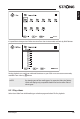
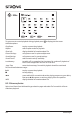
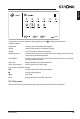
Table Of Contents

To get access to control playback during playback press to display/exit the menu.
Available options:
Play/Pause to play or pause the slideshow playback
Repeat select repeat mode for slideshow playback
Shuffle on/off shuffle for slideshow playback
Rotate/Duration to rotate picture on screen and to define how long picture will stay on
screen during slideshow playback
Zoom/Effect to zoom in picture on screen and to define effect for picture changing
during slideshow playback
Show info display detailed information about file
Photo Frame Image to mark picture as Frame image
RCU multimedia buttons usage:
u2 to play or pause the slideshow playback
3 to stop show/playback
5 6 (not used)
INFO display detailed information about file
8.2.3 Play music
Select icon Audio from Multimedia type selection page and select file for playback.
English
25
www.strong.tv