
Operation Manual



9-9
Chapter 9: Troubleshooting
Symptoms, Causes and SolutionsSymptoms, Causes and Solutions
Symptom Possible Cause/Solution
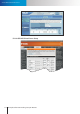
Network diagnosis
shows error icon.
Network connection error.
The network connection test veries if the camera has successfully connected to the LAN
network. When the diagnosis result shows a red exclamation mark icon ( ) for network
connection, it means the camera fails to connect to LAN network. Check if the LAN cable
is securely connected to the Ethernet port of the camera and to your hub/router, or
check if the LAN cable is functioning normally. Also check whether the gateway address
your camera uses is identical to that of your router.
Internet connection error.
The Internet connection test veries if the camera is connected to the Internet. When
the diagnosis result shows a red exclamation mark icon ( ) for Internet connection,
it may represent a failed connection to the LAN network. It could also be caused by
inappropriate settings on your router that makes your router unable to connect to the
Internet, such as wrong PPPoE user name/password, or wrong WAN IP setting (when
your ISP provides you with xed IP address). See if your PC connected to your router can
also access the Internet. If not, consult your ISP/ router manufacturer for correct Internet
setting. If your router can connect to the Internet but your camera connected to your
router cannot, check whether the IP, subnet mask and gateway is correctly set on your
camera.
HTTP/RTSP port error.
HTTP port is used for transmitting web pages, commands over the Internet. RTSP port
is used for sending video/audio data. These two test items will fail whenever port
forwarding is not enabled. Make sure you have enabled port forwarding on your router
and have allowed trac on ports your IP camera is using. Refer to the "Remote Viewing
via Internet Explorer" section of this manual for more information.