
Operation Manual




9-4
Storex DNR-30H Network Camera
Trouble with Remote Viewing on BrowserTrouble with the ActiveX Client
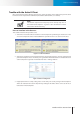
Figure 9-5. Browser security setting
If you’ve gone through all of the above steps but are still unable to obtain video/audio on the browser, please
close all the browser windows and delete the "Storex Embedded" folder found under "(OS Drive):\Program
Files". (If you're using 64-bit windows, look for "(OS Drive):\Program Files (x86)".) And open your web browser
and log in to the IP camera again to reinstall the ActiveX client. Finally, if you encountered the error where the
browserreturns“213lenotfound”,pleaserestartyourcomputer,whichshouldhelpinthissituation.