
Operation Manual






6-5
Chapter 6: Conguration
Audio SettingsCamera Settings
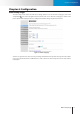
Figure 6-5. IR light control
Forschedulingon/otimeoftheIRLEDs,youcandirectlyinputthedesiredopenandclosetime,andsetthe
repeat option to be [always] or [only during time frame]. (In this example above, the system will leave the IR
LEDs on between 19:00 to 23:00 from Monday to Friday.)
Embed Text and Image
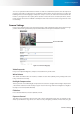
Youcanembedtextand/orimageon4dierentlocationsonthelivescreen.(UpperLeft,UpperRight,Lower
Left, Lower Right). To embed image, click on the Upload Image link and choose a suitable image. (Limited to
JPEG/BMP, 100x30 pixels, 128KB) To remove an embedded image, press the Clear button.
Flip Mode
Enablethisoptionwilliptheimagevertically,makingtheimagerotated180degrees.Enablethissetting
when you need to reposition your camera from standard position to ceiling mounting position.
Smart Focus
Choose [Indoor] or [Outdoor] based on the characteristics of your monitored scene. Choosing [Indoor] option
will bring about refocusing upon small changes in the scene. Choose [Outdoor] when your camera is installed
at a location overlooking a wide area and scene changes are expected.
Audio Settings
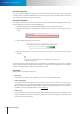
Here you can choose to enable or disable the audio and also adjust the volume. The Stream-2 audio is only
available for adjustment when you turn on the 2nd Stream and check its 3GPP mode option under video
settings.
Figure 6-6. Audio settings page