
Operation Manual






6-4
Storex DNR-30H Network Camera
Audio SettingsCamera Settings
level is automatically determined by the camera under normal lighting condition. When [Auto] is selected
and low environment lighting is detected, the shutter speed and gain level will be set as 1/30s and 7.5
respectively unless you have enabled the Low Light Behavior option and manually specied exposure and
gain setting.
Low Light Behavior
Switching on the Low Light Behavior will produce better and clearer image when the camera detects low
environment lighting. When the Exposure Control is set as [manual], the Low Light Behavior control will be
dimmedandinaccessible.Herethedefaultsettingis[O],andtheshutterspeedandgainlevelwillbesetas
1/30s and 7.5 by default on the condition that low environment lighting is detected. Switching on the low
light behavior allows you to manually set the shutter speed and gain level in the case of low environment
lighting. There are two adjustable parameters for low light behavior.
• MaximumExposure-Adjusttheshutterspeedbyselectingbetween“Disable”and“30fps”.Lowerframe
rate means longer exposure time, which allows more light to be captured by the image sensor. However if
there is fast motion in the scene, increased exposure time will result in motion blurs in the captured image.
Choosing [Disable] will use the default value of max. exposure and max. gain in low-light setting, which are
30 fps and 7.5 respectively.
• MaximumGain- This allows you to adjust the gain level between 1 and 8.5 dB. Higher gain level increases
the brightness of the picture but also increases the noise in the picture.
LED Indicator
ThisletsyoucontroltheLEDindicatoratthefrontofcamera.TurnontheLEDindicatororturnitoincase
you don’t want people to notice the camera is working.
IR Light Control
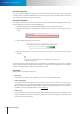
The network camera is equipped with an IR light sensor and 12 IR LEDs, which makes it capable of fitting
dierentlightingsituationsandproviding24/7monitoring.
IR LEDs
IR Light Sensor
Normal lighting
(Indoor lights on)
Without IR LEDs
(Indoorlightso)
With IR LEDs
(Indoorlightso)
Figure 6-4. Eect of IR LEDs
The IR light sensor allows the camera to detect the lighting condition of the environment and to turn on/
otheIRLEDsaccordingly;youcanconguretheIRlightoperationmodetobe[Auto],[AlwaysOn],[Always
O ],or[BySchedule].