
Operation Manual



Page 30
7.14 – DISPLAY
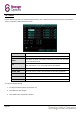
Use the display setup menu to customise channel names, show / hide the date and time in live view and playback
modes, and enable / disable preview channels.
NAME:
Enter a new title for the selected channel using the virtual keyboard.
POSITION:
Reposition the channel title.
COLOR:
Click SETUP to adjust chromaticity, luminosity, contrast and saturation
for the selected channel.
LIVE:
Choose whether the channel can be seen if the monitor is in public
view. See section “7.15 – Live” (page 31) for more details.
PREVIEW TIME:
Select ON / OFF to show or hide the date and time during live view.
RECORD TIME:
Select ON / OFF to show or hide the date and time during playback.
DEFAULT:
Reset these settings to factory defaults.
APPLY:
Save changes made to these settings.
EXIT:
Return to the previous menu.
To customise display settings:
1. Configure the above options for channels 1-4.
2. Click APPLY to save changes.
3. Click CLOSE in the confirmation window.