
Operation Manual



Page 29
7.13 – USER PERMISSIONS
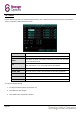
Click PERMISSION on the User Password Setup screen to open the User Permission menu.
Here it is possible to choose what the selected user has access to.
NOTE
This page can only be adjusted by an admin account. Users can see but not change their permissions.
NEXT:
Continue to the next page of permissions.
ALL:
Select all permissions.
CLEAN:
Unselect all permissions.
APPLY:
Save the current permissions settings.
EXIT:
Return to the previous menu.
To configure user permissions:
1. Click the boxes to check the features which should be available to the user.
2. Click NEXT to continue to the next page and click the boxes to check more features.
Click ALL to check (allow) all features for this user.
Click CLEAN to uncheck (deny) all features for this user.
3. Click APPLY to save changes.
4. Click EXIT to close the menu.