
Operation Manual



Page 25
7.7 – HDD MANAGEMENT
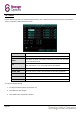
This page displays essential information about the system’s internal hard drive, and lets you format the HDD or a
USB flash drive (not included).
HDD STATUS:
The system will display “OK” if the HDD is operating correctly, or “No
Disk” if a HDD is not present.
SIZE:
Size (in Gigabytes, GB) of the internal HDD.
FREE SPACE:
The space (in Gigabytes, GB) remaining on the system’s internal HDD.
AVAILABLE TIME:
Recording time remaining on the HDD based on current recording
settings (e.g. resolution, quality, number of connected cameras).
OVERWRITE:
If enabled, the system will record over the oldest video data once the
HDD is full.
If disabled, recording will stop once the HDD is full and the “FULL” LED
will light up on the system’s front panel.
HDD FORMAT:
Erases and prepares the HDD for use.
U DISK FORMAT:
USB flash drives should always be formatted before use.
CAUTION
Formatting the HDD / USB flash drive will erase all data! Once erased, the data cannot be restored,
so be completely sure you have backed up any important data before formatting.
NOTE
Failure to format the USB flash drive may result in improper functionality.