
Operation Manual


Page 13
6.2 – REAR PANEL
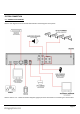
Refer to the diagram and table below for information on the DVR’s various connections.
REFERENCE
PHYSICAL CONNECTOR
DESCRIPTION
1
POWER input
DC 12V / 3A
2
VGA output
Connect to a monitor with VGA (D-Sub) input
3
RJ45
Connect to a computer network
4
USB ports
For USB flash drive (top) and mouse (bottom)
5
RS485
Connect to PTZ camera
6
Video output
Connect to a TV or monitor (BNC)
7
Audio output
Connect audio output (phono)
8
Audio input
Connect audio input (phono)
9
Video input
4x numbered video inputs for cameras (BNC)
To connect a camera via BNC:
1. Align the BNC connector with the notches on the BNC socket and
slide into place.
2. Rotate the BNC connector clockwise until it locks in place.
To disconnect a camera:
1. Apply pressure to the BNC connector, then rotate anti-clockwise.
2. Slide the BNC connector away from the socket.