
Manual

Instruction Manual
6
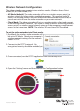
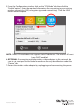
5. From the Conguration window, click on the “STA Mode” tab then click the
“Enable” option. Enter the required information for connecting to your existing
wireless network (i.e. SSID, encryption type and network key). Click the SAVE
button once complete.
NOTE: Client/STA mode does not support static IP addresses. The wireless AP must
have DHCP enabled.
6. OPTIONAL: If connecting multiple wireless video adapters to this network, be
sure to set a unique Device Name for each one for easy identication under the
“Device” tab.
7. Restart the wireless video adapter by unplugging and reconnecting the power.