
Instruction Manual

Instruction Manual
6
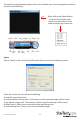
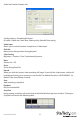
Under the Encoder Property tab:
a) Video Setting - Recording le format
b) Prole - Video size, Frame Rate, Video quality, Video Bit Rate setting
Video Input
Allows you to switch between Composite or S-Video input
Slide Bar
Move to any video position during playback
Color Setting
Brightness / Contrast / Hue / Saturation adjustment
Mute
Volume On / O
Pause
Pause the playback le
Record
When you click this button, video recording will begin. If you click the Stop button, a table will
be displayed asking you to rename or save the le. The default le name is MDDHHMMSS, (i.e.
Month, Date, Hour, Minute, Second).
Stop
Stop recording or playback
Playback
Play the recorded le
SnapShot
Image capture resolution will match that of the Video Window (preview window). Clicking on
SnapShot will launch the following table: